 LiveBridge
Make music in Ableton Live by talking to Claude.
LiveBridge gives Claude 226 tools for Ableton Live: beats and basslines, chords and arps, Serum 2 sound design, automation, song structure, mixing, your whole sample library and Splice. With the optional Max for Live devices, Claude also listens while the song plays, moves parameters in time and plays along. You describe the music; Claude builds it in your set, one undo step at a time.
- macOS and Windows
- Every Live 12 edition
- Max for Live optional
- Claude Code and Claude Desktop
- live_transport_set(tempo=124)
- live_browser_load("909 Core Kit", new_track=true)
- live_clip_write_pattern(track="Drums", repeat=8)
- live_browser_load("Sub Bass", new_track=true)
- live_clip_write_pattern(track="Bass", step="1/8")
- live_browser_load("Warm Analog Pad", new_track=true)
- live_clip_write_chords("Am7 Fmaj7 Cmaj7 G")
- live_mixer_set_many(-6 dB, -9 dB, -15 dB)
- live_scene_fire(scene="Groove")
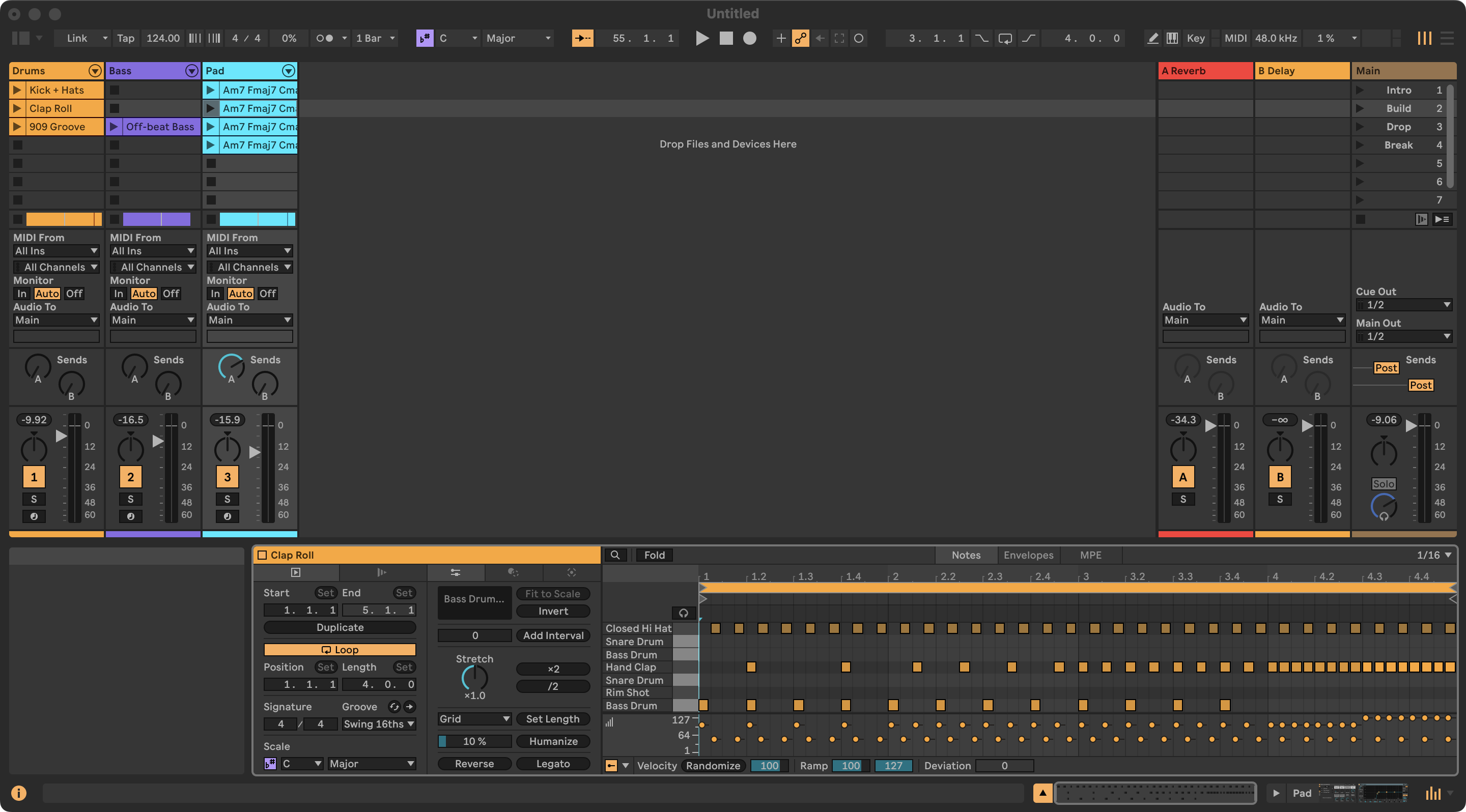
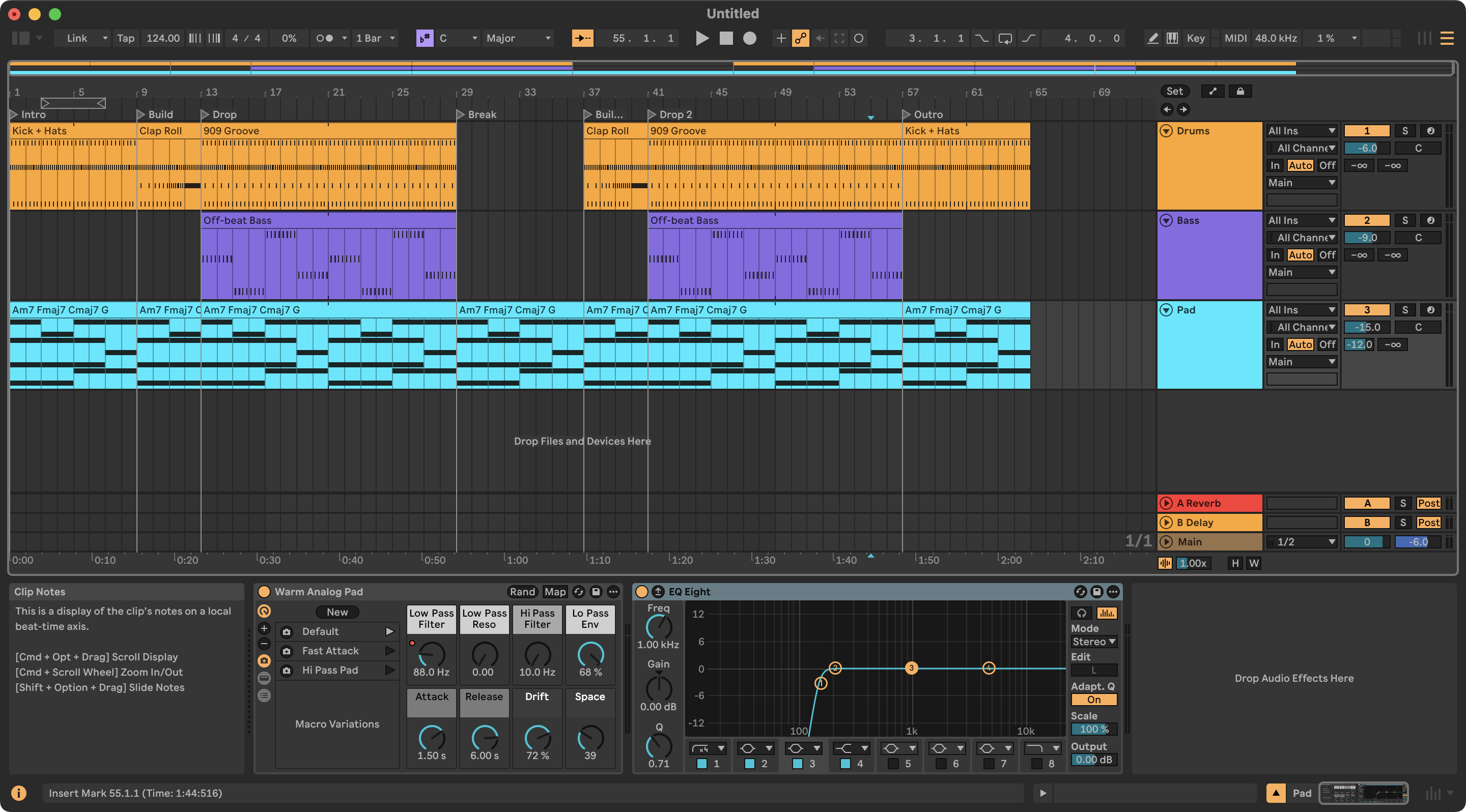
Not a mock-up: this is what it built
Screenshots of Ableton Live 12.4.5 after examples 1, 5 and 6, built through LiveBridge alone: a drum pattern mapped onto the 909 kit's pads, an off-beat bass, voice-led chords, a clap roll into the drop, a 64-bar arrangement with locators, and a low cut on the pad.
What you can ask
Every example shows the prompt, each tool call Claude makes and what Live answers. They were run against a real Live (12.4.5; the mix and master example on 12.4.16), except the two-computer setup, Splice's own search and the steps that play audio in example 6.
Why LiveBridge
Not a demo that plays a few notes, but everything Live's API allows, with tools built around how producers actually work.
All of Live
226 tools backed by 200 commands: transport, tracks, clips, notes, devices, racks, browser, automation, arrangement, routing, recording. Plus the full Live Object Model for anything else.
Tools that think like a producer
Drum patterns written against the kit's pad names, chords from symbols or Roman numerals with voice leading, arps, basslines, swing, humanize, filter sweeps and LFOs, mixing in dB.
Ears
A music-theory check (key, chords, clashes between parts), audio analysis of bounces (LUFS, spectrum, stereo, tempo, key, masking between parts, before/after), technical problems (clipping, hum, polarity, resonances with the EQ cut to fix them), kick-and-sub phase alignment, and with the LiveBridge Engine device, all of it live while the song plays.
Serum 2, the whole patch
Big VST3 plug-ins expose none of their knobs to Live until you click Configure. LiveBridge exposes up to 128 of them for Claude, no clicking needed — and beyond that designs complete Serum 2 preset files (wavetables, mod matrix, FX order), your packs from older Serum builds included, and loads them onto a track.
Splice in the same conversation
Claude searches and downloads with Splice's official MCP server, then LiveBridge puts the sample where you want it: a slot, the arrangement, a Simpler or a drum pad.
Two computers
Claude on your laptop, Live on the studio PC, or the other way round. Discovery on your network, a token on every request, files sent across automatically.
Safe to try
Every change is one undo step. Local-only by default, with a token; LAN mode is opt-in, and Python inside Live can be switched off.
Tested
1,600+ unit tests against a simulated Live on macOS, Windows and Linux, plus end-to-end checks and probes on a real Live 12.4.
Your whole sample library
Everything Live's browser lists under Samples — Core Library, packs, User Library, your folders — searchable by words and Live's own tags ("Drums|Kick", "Character|Punchy"), most used first, "sounds like this one", duplicates, categories and every installed plug-in.
Arrangements with their automation
Scenes become a song with their filter sweeps and fades as real automation lanes, and copied sections take their lanes along — Live's API drops both, LiveBridge records them back in a fast background pass.
Production know-how and memory
Genre recipes from techno to drum & bass, every Serum 2 control, melody craft with a checker that catches flat, scale-walking lines (live_theory_melody), moods turned into notes, transitions per genre, workflows for extending an arrangement or fixing a mix; a sound library for presets you like, generative Euclidean rhythms and note chance, and notes about your project Claude remembers next session.
Optional: Max for Live devices
Live's API cannot hear audio, move a parameter in time or see your keyboard. Small Max for Live devices can — and reach every parameter of a plug-in — and Claude adds them to your set itself when a task needs them. Everything else works without them. They need Max for Live (Live Suite, or Standard with the add-on); the channel strip and mastering devices need Max 9 (Live 12.2 or newer). The installer puts them in your User Library.
Real-time listening
LiveBridge Engine on the master or a track: momentary and short-term LUFS, peaks, crest, 8-band balance, stereo correlation and low-end width while the song plays, the last minute kept — no bouncing. live_engine_listen
A/B and masking while playing
Save a reading, change the EQ or the patch, compare. Engines at the end of tracks find which parts fight for the same frequencies, at fader level. live_engine_compare · live_engine_masking
Captures
Record what several tracks play to WAV at the same moment, for analysis, comparison or resampling onto a drum pad. live_engine_capture
Live modulation
Tempo-synced LFOs and step sequences on any parameter — filter wobbles, gated sends, auto-pan — without writing automation; stop it and the knob goes back. live_engine_modulate
Follow actions
Live's follow actions are not in its API, so the Engine plays them: every N bars the next, another or a random clip (or scene), weighted, with a chance and a seed — evolving loops and generative arrangements. live_engine_follow
What you play, and playing along
LiveBridge MIDI before an instrument keeps the last 10 minutes of what you played, as clip-ready notes ("turn that riff into a clip"), and plays phrases into the instrument in time with the song. live_midi_played · live_midi_play
Faster automation recording
Arrangement lanes can only be recorded by playing. The Engine writes them 50 times a second while the pass runs at a raised tempo: about five times faster than real time. live_automation_record(speed="fast")
Every plug-in parameter, past 128
LiveBridge Host loads a VST3 inside Max's vst~: Claude reads and sets every parameter by name and display text (Serum 2 ~540, Massive ~200), sees what you turn in the plug-in's own window, loads and saves its patch as a .vstpreset, then hands it over to a native rack exposing the ≤128 controls that matter — automation and undo as usual. live_plugin_host_parameters(touched=true) · live_plugin_host_expose
Balance and master by measurement
"Mix and master this" is one call: Claude puts its own channel strip on every track and a mastering chain on the master — no devices to drag in — then EQs, compresses and high-passes each part for its role, fixes kick against bass, balances the faders and masters to a loudness target. A sound check finds silent or filter-strangled parts before you build on them. Faders go to role levels (kick on top) in real dB, with each band problem placed on a track or the master; the master is driven to a Spotify, Apple or club loudness target and stops before the punch goes. A rerun on a settled mix changes nothing, and the targets are checked against professionally mix-mastered releases. Your own plug-ins on the tracks? It can just measure, balance and master, and leave your processing alone (strips="measure") — or do the work on your own plug-ins: the master through FabFilter Pro-L 2 or the iZotope Ozone 12 Maximizer, its EQ fixes on Pro-Q 4 or the Ozone 12 Equalizer, each track's EQ and compression on Pro-Q 4 and Pro-C 3. live_sound_check · live_mix_auto · live_mix_unmask · live_mix_phase · live_mix_balance · live_master_auto
How it works
A small MIDI Remote Script runs inside Live; an MCP server turns it into tools Claude can use. The optional Max for Live devices talk to the same MCP server over their own local, token-protected connection.
Claude
Claude Code, Claude Desktop or any MCP client. Splice's MCP server can sit next to it.
MCP server
226 validated tools, a reconnecting client and network discovery. Python 3.10+.
Remote Script
Runs every command on Live's main thread against the Live Object Model. One undo step each. Optional: the LiveBridge Engine, MIDI and Host devices.
Install in a few minutes
You need Ableton Live 12, Python 3.10 or newer, and Claude Code or Claude Desktop. The installer does the rest: the Remote Script, the MCP server, a random token, registration with Claude (and Splice), the LiveBridge skill and the Max for Live devices.
git clone https://github.com/morpheasgr/livebridge-ableton-mcp.git LiveBridge
cd LiveBridge
./installers/install.sh
git clone https://github.com/morpheasgr/livebridge-ableton-mcp.git LiveBridge
cd LiveBridge
powershell -ExecutionPolicy Bypass -File installers\install.ps1
No git? Download the zip,
unzip it into a folder you keep and double-click Install LiveBridge.bat (Windows)
or Install LiveBridge.command (macOS). Later, Update LiveBridge in the
same folder updates it in place and runs the installer again.
- Start Live and pick LiveBridge under Preferences → Link, Tempo & MIDI → Control Surface (Input and Output: None). Live's status bar says
LiveBridge … ready on port 9880. - Restart Claude Desktop or open a new Claude Code session.
- Ask: “run live_status”, then try “make me a beat”.
Flags, manual setup, a second computer and troubleshooting: install guide · troubleshooting.
226 tools, 30 areas
Named live_<area>_<verb>, validated before anything changes,
and forgiving about input: tracks by name, positions as 17.1.1, values the way the
knob shows them ("-6 dB", "1/8", "800 Hz").
Prompts to try
Plain sentences, with the names you see in Live.
FAQ
Which Ableton Live versions does LiveBridge support?
Ableton Live 12, in every edition. It was built against Live 12.4.5 Suite and is tested up to Live 12.4.16. Live 11 is not supported: the Remote Script is written for the Python 3.11 that Live 12 embeds.
Do I need Max for Live?
No. LiveBridge is a MIDI Remote Script, the same kind of script that drives Push and other controllers, so it runs in every edition of Live 12. With Max for Live (Suite, or the add-on) optional devices add real-time listening, live modulation, follow actions, MIDI input, faster automation recording, mixing and mastering by measurement, and every parameter of any VST3 plug-in.
Which AI apps can use LiveBridge?
Claude Code and Claude Desktop, which the installer sets up together with the LiveBridge skill, and any other MCP client that can start a local (stdio) server.
Can Claude hear my music?
Yes, in numbers. With the LiveBridge Engine device it reads loudness, spectral balance and stereo image while the song plays; without it, it measures bounced audio (loudness, spectrum, stereo, tempo, key) and checks harmony with a music-theory analysis. Your ears still have the final say.
Does arranging keep my automation?
Yes. Live's API drops clip envelopes when it copies clips into the arrangement and cannot read automation lanes, so LiveBridge records them back: scenes laid out as a song keep their sweeps and fades, and copied sections take their lanes along.
Is LiveBridge free?
Yes, free and open source under the MIT license. You need Ableton Live 12 and a Claude plan; Splice is optional (searching is free, downloads use your Splice credits). If it helps your music, you can buy its original author a coffee.
Does it work on Windows, and across two computers?
Yes. It runs on macOS and Windows, and Claude and Live can run on two different computers in your network, Mac and PC mixed.
Will it mess up my Live set?
Every change Claude makes is one undo step in Live. Claude asks before deleting or overwriting your material and doesn't start playback or recording unless asked. Save your set yourself: Live's API cannot save.